[skip to main content]

Dragon NaturallySpeaking Professional V10

Dragon NaturallySpeaking Professional V10

Price: £499.00 (£586.33 inc. V.A.T.)

R.R.P. £549.00

Next Day Delivery


Product Details

Dragon NaturallySpeaking is the market leading Speech Recognition programme, with Version 10 the very latest release. Put simply, as you dictate, the words are transcribed in real time on screen. The technology may be used to speed up work creation (everyone speaks faster Link to Multi User Licencesthan they type), or as a preventative measure/solution to anyone with an assistive technology requirement such as sufferers of RSI (Repetitive Strain Injuries) or disabilities which hinder use of the computer.

Ideal for anyone wishing to avoid the tedium of typing, Speech Recognition acts as a third input device to replace or compliment use of the keyboard and mouse.

Using Dragon NaturallySpeaking, users are able to create documents and emails, fill out forms and streamline workflow tasks.

BOX CONTENTS: Dragon NaturallySpeaking Professional v10 software disk. User Manual. Standard Headset Microphone.

Key Improvements

Expanded language module and improved accuracy

Expanded language module and improved accuracy means users can expect to achieve 99% accuracy with Dragon Version 10

Immediate creation of a voice profile

Prior enrolment is no longer a necessity allowing immediate creation of a voice profile.

Increased application compatibility

Increased application compatibility means the user can dictate, access and control most Windows based applications. The creation of macros and commands also facilitates the navigation of non standard databases and forms.  VoicePower can offer services and training on this advanced scripting element of Dragon.

Toolbar Indicator

A visible green or grey tool bar indicator helps in identifying those programmes already fully compatible with the software and that that may require adaptation i.e. those where the 'select and say' commands are fully supported.

Acoustic Adaptation

Dragon V10 performs continuous acoustic adaptation to ensure that even without a correction having been made, the software learns from and adapts with use.

Better adapted for enterprise wide deployment

Dragon Professional  Version 10 is better equipped for enterprise wide deployments. For users operating on a network, roaming profiles may be established allowing them access their individual profiles from multiple locations. Version 10 Professional also supports Citrix thin client environments.  Contact VoicePower for more detailed information regarding Citirx compatibility. 

View our Speech Recognition Demonstration

Key Features:Professional 10 BrochureDragon 10 Comparison Matrix

Accuracy

Dragon Professional Version 10 boasts up to 99% accuracy

Speed

Most people speak more than 120 words per minute but type fewer than 40. Create documents, emails and reports three times faster using speech recognition.

Enterprise Ready

Install and manage Dragon Professional Version 10 from a central network location – substantially eases administration as vocabularies, user profiles and installations can all be controlled in this manner.

Customisation

Use commands to automate complex multi step tasks

Natural Language Capabilities

Quickly add custom words (e.g. place or personal names, abbreviations) whilst you dictate or scan documents to tailor your vocabulary

Text to Speech

Have emails and documents read back to you via Dragon RealSpeak 2 'Text to Speech' voices to aid checking and amending

Avoid Repetitive Strain Injuries

In using speech to control the PC you reduce exposure to repetitive strain injuries. If you suffer arthritis or carpel tunnel syndrome, Dragon will change the way you use the computer.  You won't believe what you can do by voice!

Compatibility

Dictate into, edit and control virtually any Windows application including the full Microsoft Office Suite, Internet Explorer, Corel and WordPerfect

Easy to use

Dragon Version 10 installs quickly and easily and requires no special script reading.

Why Choose Professional?

  • Option to add custom vocabularies e.g. legal and medical.   Create multiple custom vocabularies.
  • Control applications and navigate the PC by voice where Dragon NaturallySpeaking Preferred has limitations
  • Create custom voice commands to automate and streamline repetitive tasks.
  • Send emails or schedule meetings using Dragon 10 shortcuts for email and calendar
  • Short cut commands allow you to quickly browse the internet and search for information on your desktop.
  • Save audio with dictate file - for review or reference
  • Enables third party correction
  • Permits Roaming user set up
  • Access to smart formatting and smart commands
  • Complex macro support, macro recorder and advanced scripting commands
  • Capacity to import and export customised macros and vocabulary
  • Wider application support – Dragon Professional supports Outlook 2000, XP and 2003, PowerPoint 2000, XP and 2003, Lotus Notes and InfoPath
  • Please note Dragon Professional V10 may not be compatible with some Medical packages, in these instances Dragon Medical V10 is required - click here.

Dictation on the Move: 

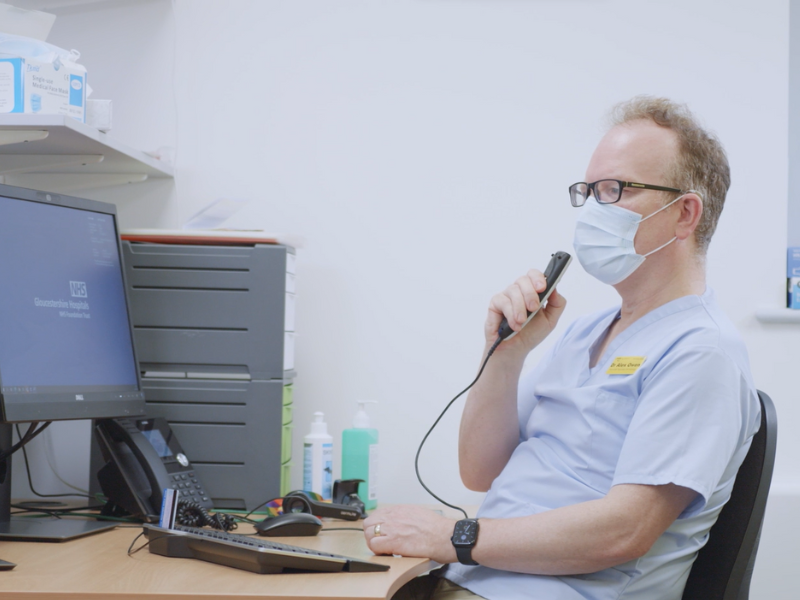
Used in conjunction with a digital voice recorder, Dragon NaturallySpeaking allows for the automatic transcription of files dictated on the move.  Recordings made out on location or away from the office can be downloaded on return to the PC, imported into Dragon and instantly transcribed onto your computer screen. With this system – flexibility is the key advantage.   See digital voice recorder here. 

Dragon Version 10 supports WMA, DSS, MP3 and WAV file formats.

To view our range of recorders for use with Speech Recognition...Click Here to View Digital Recorders

Third Party Correction:

Perhaps you do the dictation but would like someone else to do the checking and amending?  Dragon Professional Version 10 allows for 3rd party correction; where the sound file and completed document are sent to a secretary or colleague to play back and correct as required. Any alterations made will update your voice profile, contributing to the increased accuracy of the system with use. Voice notations may also be left by the dictator (appearing as highlighted instructions to the 3rd party editor) and can then be accepted or rejected as required.

Input Devices:

VoicePower stock a range of handheld, headset and wireless input devices for use with speech recognition software. Whether it’s USB connection, microphone jacks or a particular wearing style you are searching for, all models on our site have been tested and checked for suitability and compatibility.  Please note that some headsets and microphones are not suitable for use with speech recognition and will give poor accuracy.

To view our range of headset microphones and handheld microphones for use with Speech Recognition...Click here for Input Devices

Looking for a  wireless option?...See our Dragon Professional 10 bundled with the New Plantronics Calisto Wireless Mike

Training & Support:

VoicePower specialises in the provision of training and support to speech recognition users. Training is typically conducted on a one to one basis and ensures the optimum set up and installation is achieved. Trainees are equipped with the skills necessary to master the technology; to maximise productivity, efficiency and ease of use.

For information regarding our training courses view our Training Section

Customisation & Integration

Training and familiarity with speech recognition software may equip you with the necessary skills to set up macros and commands to ease navigation and control of application or templates by voice. However, you could ask us to do it for you! VoicePower offers consultancy and integration services to individuals and business alike.

For further details regarding the customisation and adaptation we may offer you please Contact Us

Recommended System Specification

Intel® Pentium® / 2.4 GHz processor (1.6 GHz dual core processor) or equivalent AMD processor. Faster processors will yield faster performance. 1 GB RAM (Windows Vista™ will benefit from as much memory as possible). Free hard disk space: 2 GB, DVD-ROM drive (required for installation). Microsoft® Internet Explorer 6 or higher (free download available at www.microsoft.com). Nuance-approved noise-cancelling headset microphone (included) - other models and hand-held input devices available. A web connection is required for activation.

Supported Operating Systems

Windows Server 2000, Windows Server 2003, Win XP SP2 or higher - 32 bit - Home & Prof, Win 2000 SP4 or higher, Windows Vista™ or Windows Vista™ SP1, 32-bit (all 4 editions) -

Please note that for compatibility with 64 bit processors and Windows 7 Dragon Professional 10.1 is required.  L2 Cache: 1 MB. Additional OS Support for Professional, Legal, and Medical Editions.

Citrix MetaFrame Presentation Server 4.0 or 4.5 During the install process, the software checks to make sure your system meets these minimum requirements. If your PC does not meet the requirements, the software will not be installed. The absolute minimum the software will load onto is: Intel® Pentium® / 1 GHz processor or equivalent AMD processor, 512 MB RAM or 1 GB RAM for Windows Vista™

Dragon NaturallySpeaking Professional Version 10.1 is now available from VoicePower

May we suggest